The command bar
One line, in your own words
Type it the way you’d tell a friend. Dayline turns one line into the right entries: an expense, a meal, a mood, a task or a reminder.
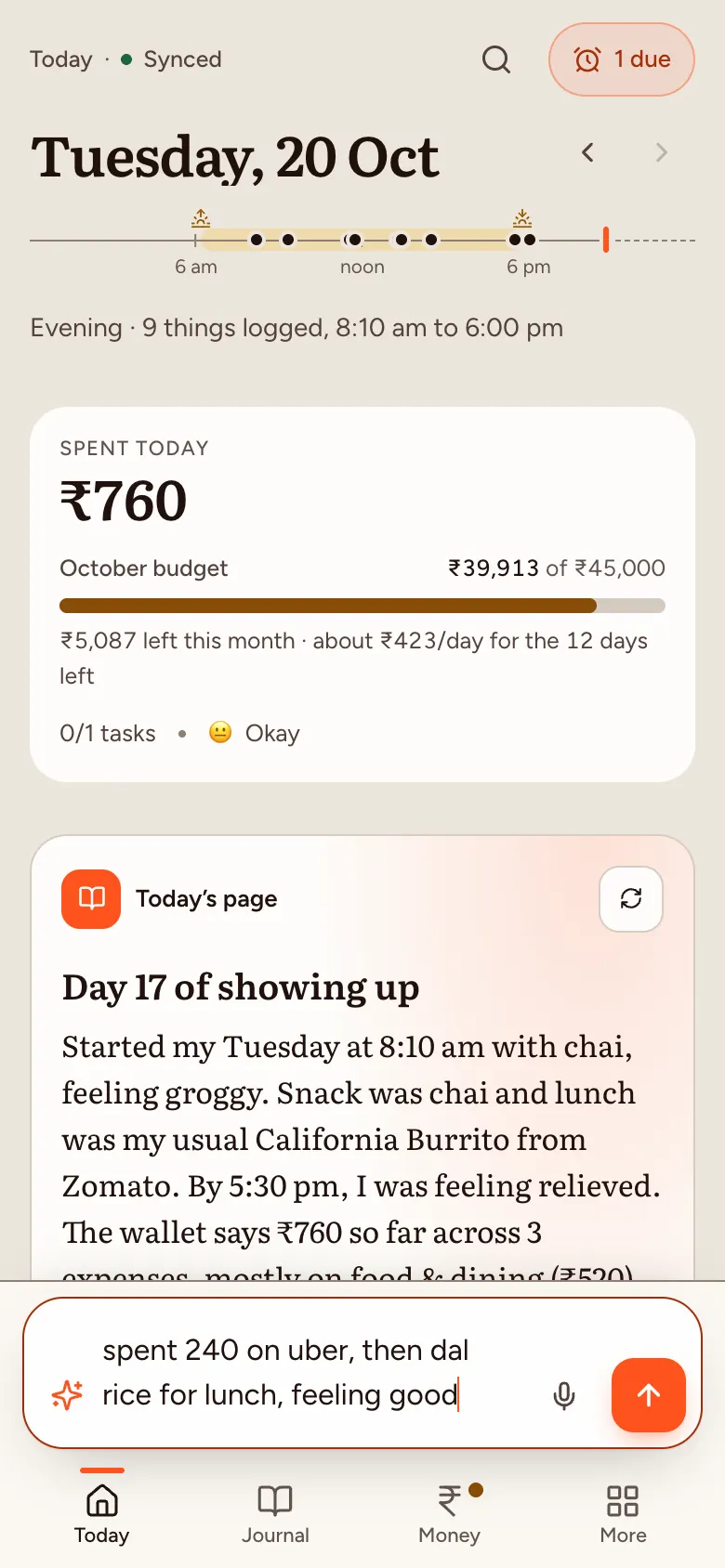
For example: spent 240 on uber, then dal rice for lunch, feeling good
Free during the beta
Type one line, like you’d text a friend. Dayline logs the expense, the meal and the mood, keeps your tasks and reminders, and writes the story of your day. Your entries are encrypted on your device before they sync.
Google only shares your email with us. It can’t open your diary.
Not available in the EU, EEA, UK or Switzerland yet.

What it does
No forms, no categories to pick, no separate apps for money, food, mood and to-dos. Write what happened; Dayline sorts it.
The command bar
Type it the way you’d tell a friend. Dayline turns one line into the right entries: an expense, a meal, a mood, a task or a reminder.
For example: spent 240 on uber, then dal rice for lunch, feeling good
Expenses
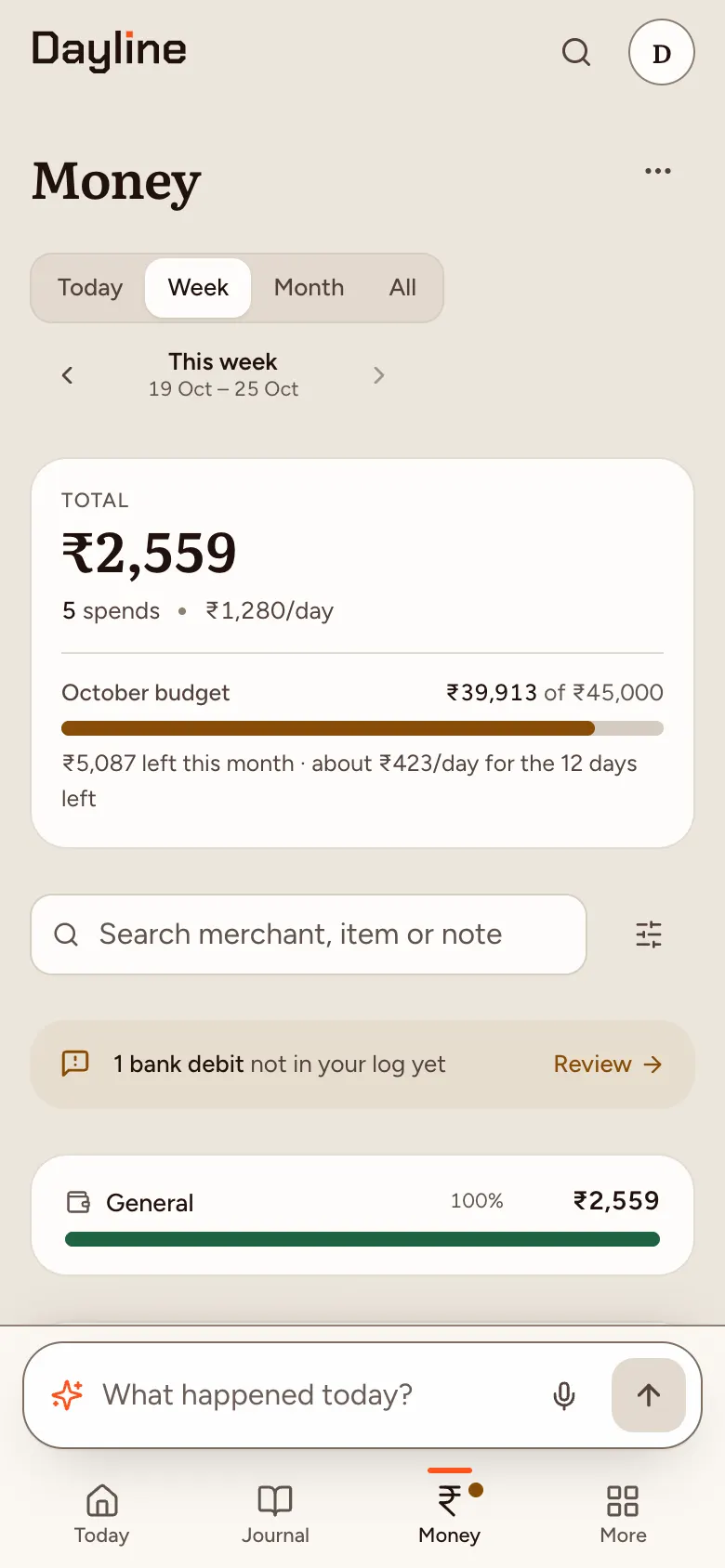
Every spend lands in a category, against a monthly budget, with a daily pace that tells you what’s left for today. See today, the week or the month, and search by merchant, item or note.
For example: 1,200 groceries at DMart
Meals and calories
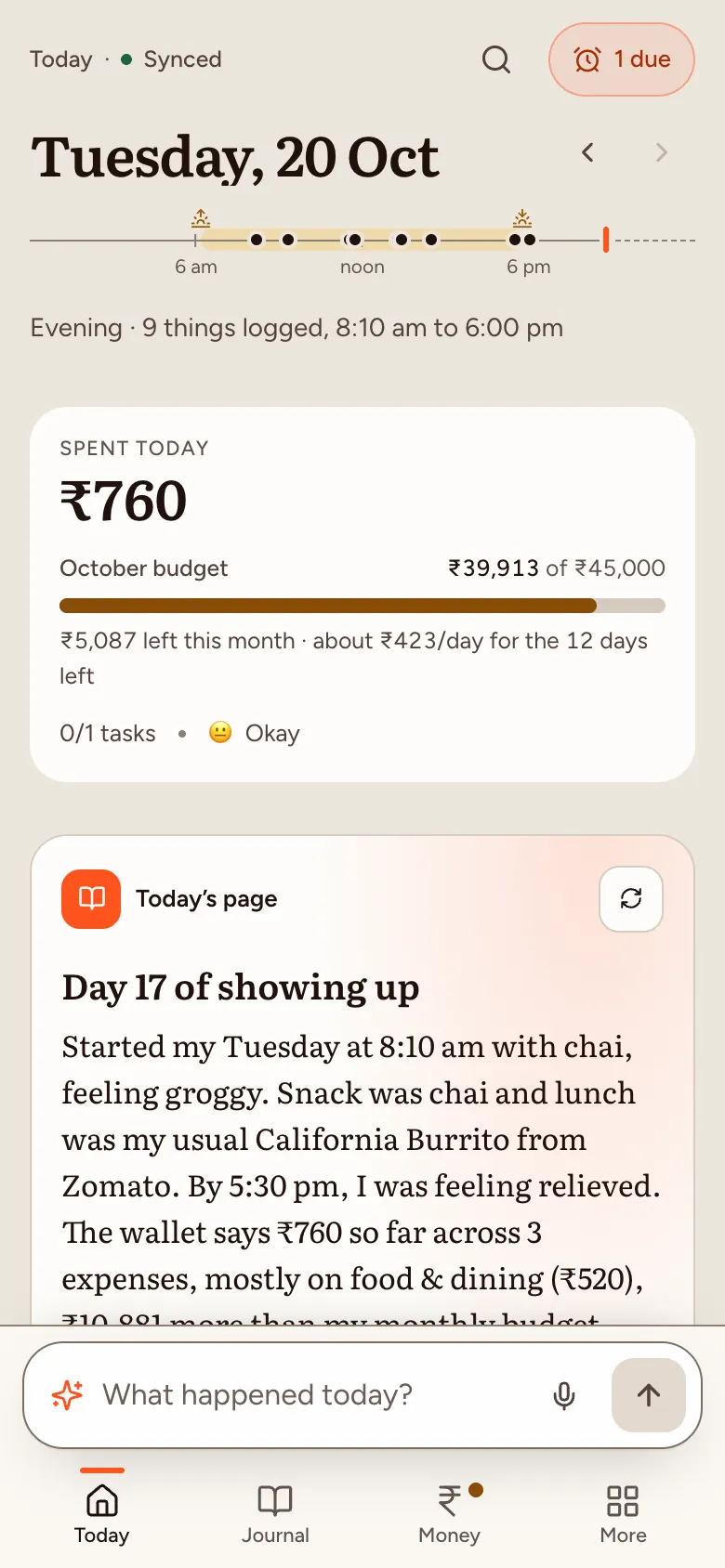
“Dal rice for lunch” becomes a meal. Say the calories if you know them, or let the AI estimate them; estimates are marked as estimates.
For example: two idli and coffee for breakfast
Mood
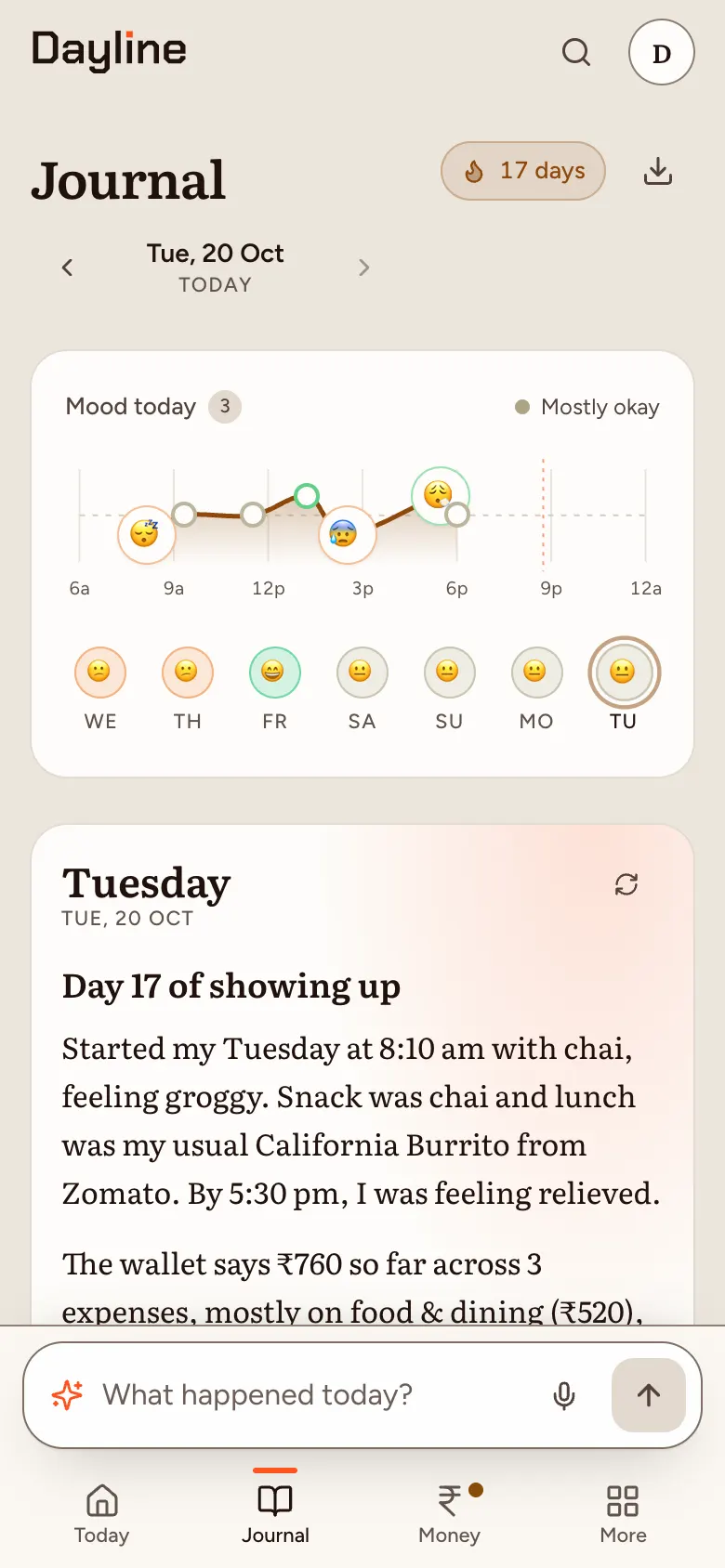
Moods you mention become a line through the day and a row across the week, so you can see what lifts you and what drags.
For example: feeling groggy, slept badly
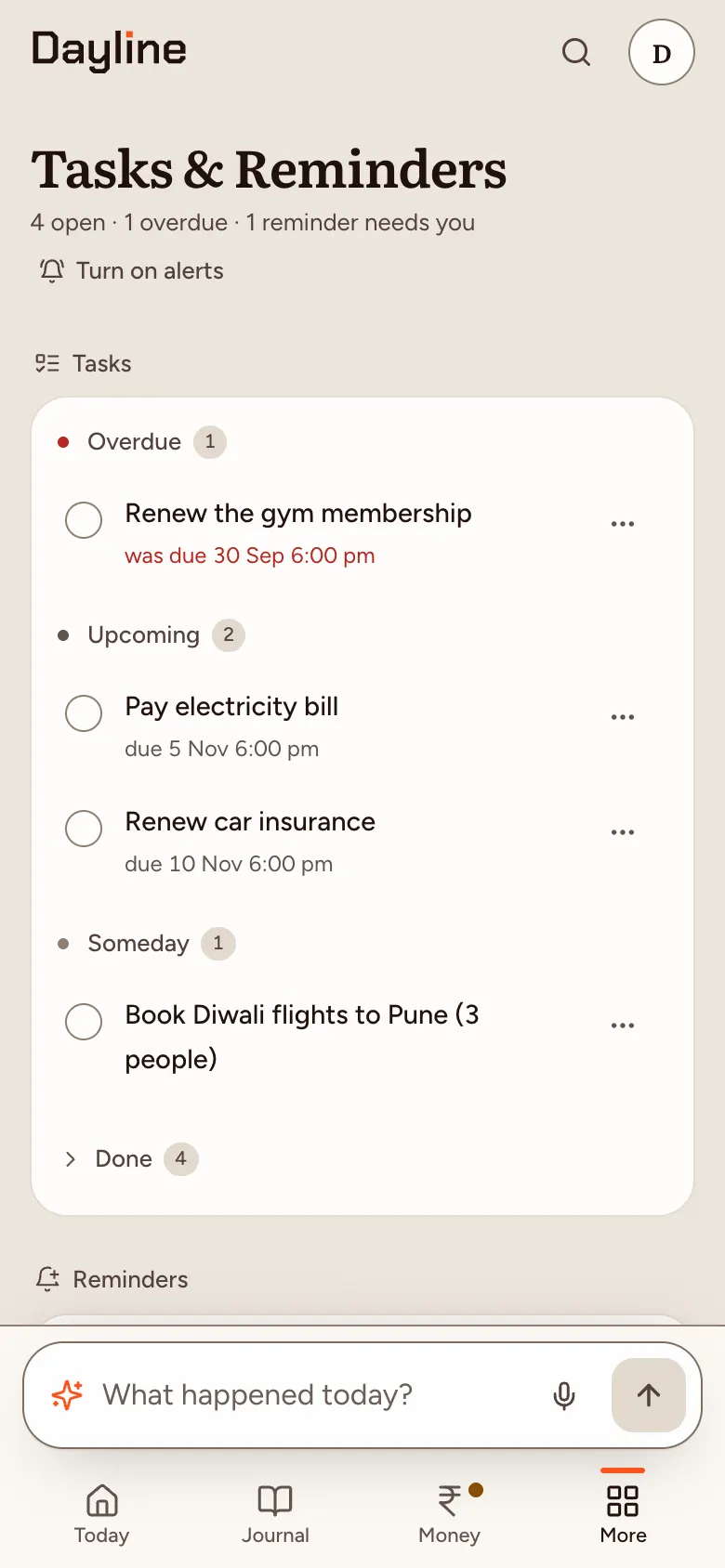
Tasks and reminders
Due dates and reminders come straight from what you type. Turn on notifications and they reach your phone, even when Dayline is closed, with Done and Snooze right on them.
For example: remind me to water the plants at 7
The story of your day
Dayline writes a short story of the day from your entries: when it started, what you spent, ate and felt, and what’s still open. The built-in story is always there; AI-written stories are optional and stay off until you turn them on.
“The day began around 8:10 am with chai, feeling groggy. Snack was chai and lunch was my usual California Burrito from Zomato. By 5:30 pm, I was feeling relieved. Money-wise, ₹760 went out so far across 3 expenses, mostly on food & dining (₹520). ‘Book Diwali flights to Pune (3 people)’ is still on the list.”
Privacy, stated plainly
These are the same words the app shows you in Settings › Privacy & security. Each one says what protects it: encryption, a policy promise, or trust in our code.
Guaranteed by encryption
Your entries, memory, people and places, money, health, settings, stories and agent traces
Encrypted on your device before they sync. We, Cloudflare and anyone with a database copy or backup see only locked data. We don’t have the keys.
Promised by policy
AI, Standard mode
To understand a message, the AI has to read it. Your message and about a page of related context pass through our server to Cloudflare’s AI. If it needs more to get a message right, the AI can look things up in your history for that message: for example a whole earlier day with its spending, up to 20 matching entries from any dates, up to 15 expenses from a date range, or what Dayline knows about a person or place, over up to 5 AI calls. All of it is used for that request and discarded. AI day stories, if you turn them on, send the whole day’s log (with the day’s mood estimate, worked out on your device, if no mood was logged). AI week and month reviews, which you ask for on the Review screen when AI stories are on, send only that period’s totals and counts (money by category with the top merchants, mood, health, and habits with your repeating tasks’ names), the names of the people and places that came up most, and each day’s title and wins (which can name a person, a meal, a task or a plan), all worked out on your device: never the entries themselves. We don’t log or store any of it, and Cloudflare’s terms say it doesn’t train on it. This is a promise, not encryption. You choose Standard AI or On-device only when you set up Dayline (nothing is pre-selected), and can change it any time; until a device has recorded Standard AI on its sign-in, our server refuses its AI requests.
By construction
On-device only mode
Nothing leaves your device for an AI model: entries are read by Dayline’s built-in rules instead. The mode applies to your whole vault, so your other devices (and ones you add later) follow it too. Entries still sync encrypted. If you switch back to Standard later, entries you logged in this mode can be read as context for new messages.
Trust in our code
The web app itself
On the web, your browser downloads Dayline’s code from us each visit. “We can’t read it” holds as long as that code is honest. Today that rests on trust in us. Each release’s file hashes are listed at /verify, so you can check that the files you got match that release; we plan to publish the source so others can check what the code does, and we haven’t yet.
Pricing
Everything is free during the beta. Subscribing doesn’t unlock extra features yet — it supports the work and locks your price.
For everyone while Dayline is in beta
Total₹0
No card, no trial clock. Before the beta ends we tell you in the app, 14 and 3 days ahead.
Start freeThe same Dayline, paid for by choice
Monthly₹349/month
Yearly₹3,299/year
Yearly is about ₹274.92 a month: more than 2 months free (you save ₹889, 21%, against 12 monthly payments). Renews automatically until you cancel; cancel any time on the Support page.
Sign in to supportSupporting needs an account: it opens on the app’s Support page.
FAQ
Your entries are locked with a key that lives on your devices. Dayline gives you a recovery key when you set up: save it (download or print it, or keep it in a password manager that isn’t tied to the Google account you sign in with). With a passkey (your fingerprint or screen lock) you usually won’t need it; it’s for when you lose every device.
Lose all your devices and your recovery key, and your diary is gone for good. Google only signs you in. It can’t open your diary.
Yes. Dayline is free for everyone during the beta. Subscribing early is optional: it supports the work and locks your price. Every account gets the beta plan: everything in Plus, with 900 AI messages a month. If you’d like to support Dayline, you can subscribe to Plus early (₹349 a month or ₹3,299 a year); it doesn’t unlock extra features yet. Before the beta ends, we’ll tell you in the app. Pricing.
It’s a web app, so there’s nothing to download from a store, and updates arrive by themselves.
Yes, any time, in Settings › Privacy & security › Your data. Download a locked archive (exactly what we store, which only your vault can open) or a readable JSON copy that’s decrypted on your device. Delete account erases your locked data, key wraps and account right away; it needs your passkey or recovery key, so someone with only your Google account can’t do it (they can schedule a reset that erases your stored data after 7 days unless one of your devices cancels it; every device shows it). “See what we hold about you” in the same place lists every record we keep about your account.
In Standard mode, yes, for each message. To understand a message, the AI has to read it. Your message and about a page of related context pass through our server to Cloudflare’s AI. If it needs more to get a message right, the AI can look things up in your history for that message: for example a whole earlier day with its spending, up to 20 matching entries from any dates, up to 15 expenses from a date range, or what Dayline knows about a person or place, over up to 5 AI calls. All of it is used for that request and discarded. AI day stories, if you turn them on, send the whole day’s log (with the day’s mood estimate, worked out on your device, if no mood was logged). AI week and month reviews, which you ask for on the Review screen when AI stories are on, send only that period’s totals and counts (money by category with the top merchants, mood, health, and habits with your repeating tasks’ names), the names of the people and places that came up most, and each day’s title and wins (which can name a person, a meal, a task or a plan), all worked out on your device: never the entries themselves. We don’t log or store any of it, and Cloudflare’s terms say it doesn’t train on it. This is a promise, not encryption. You choose Standard AI or On-device only when you set up Dayline (nothing is pre-selected), and can change it any time; until a device has recorded Standard AI on its sign-in, our server refuses its AI requests.
Prefer no AI? Choose On-device only in Settings › Privacy & security. Nothing leaves your device for an AI model: entries are read by Dayline’s built-in rules instead. The mode applies to your whole vault, so your other devices (and ones you add later) follow it too. Entries still sync encrypted. If you switch back to Standard later, entries you logged in this mode can be read as context for new messages.
Yes: tap the mic in the composer (or the Voice log widget on Android) and talk for up to two minutes. Dayline writes it down, tidies it up if you like (punctuation, filler words; your own words and language, Hinglish included), and puts it in the box for you to check and send. Nothing is saved until you send it.
To write down what you said, the AI has to hear it. Your recording (two minutes at most) passes through our server to Cloudflare’s AI, which turns it into text; with Clean up on (the default), that text goes to Cloudflare’s AI once more to fix punctuation and drop filler words. Both are used for that request and discarded: we don’t log or store the recording or the text, and nothing is saved in your vault until you send the entry, which is then encrypted like any other. We keep only how many seconds you recorded, for your monthly voice minutes. This is a promise, not encryption. In On-device only mode no audio leaves your device: the mic points you to your keyboard’s own dictation instead.
Not as you. Your devices send us counts of what happens in the app: which features are used (for example “entry logged” or “reminder created”), the type of an error and the screen it happened on (never its message), and how long page loads, unlocks, sync and AI runs take, in ranges. Each count carries only the app version, whether it’s the website, the installed app or the Android app, and the day. Never your account, a device id, your entries or an exact time, and they’re sent without your sign-in cookie. Your vault also adds one to service-wide totals the first time it’s used each day (active accounts, accounts coming back by the week they joined, AI commands a day in ranges). We keep only the totals. Small totals can still be about one person, and our server sees when your devices connect anyway. Turn it off in Privacy & security › Usage counts: then nothing is sent or added.
Yes. Sign in with Google using the same email address you used in the beta: it’s the same account, with the same encrypted vault. Your devices, passkeys and recovery key keep working as before.
Get notified
Get an email when the iOS app arrives, the Android app gets an update or paid plans start. Nothing else.
Free during the beta. Your entries stay encrypted on your devices.